 AIIC UIndy
Welcome to AIIC
The AI & Innovation Club's mission is to empower & educate students by harnessing AI for real-world impact, fostering innovative solutions that drive opportunity and progress.
Explore Our WorkEvents
Discover our most recent talks, workshops, and demonstrations on cutting-edge AI topics.
Event Countdown
Next Event: Wednesday, October 7 at 7:00 PM EDT
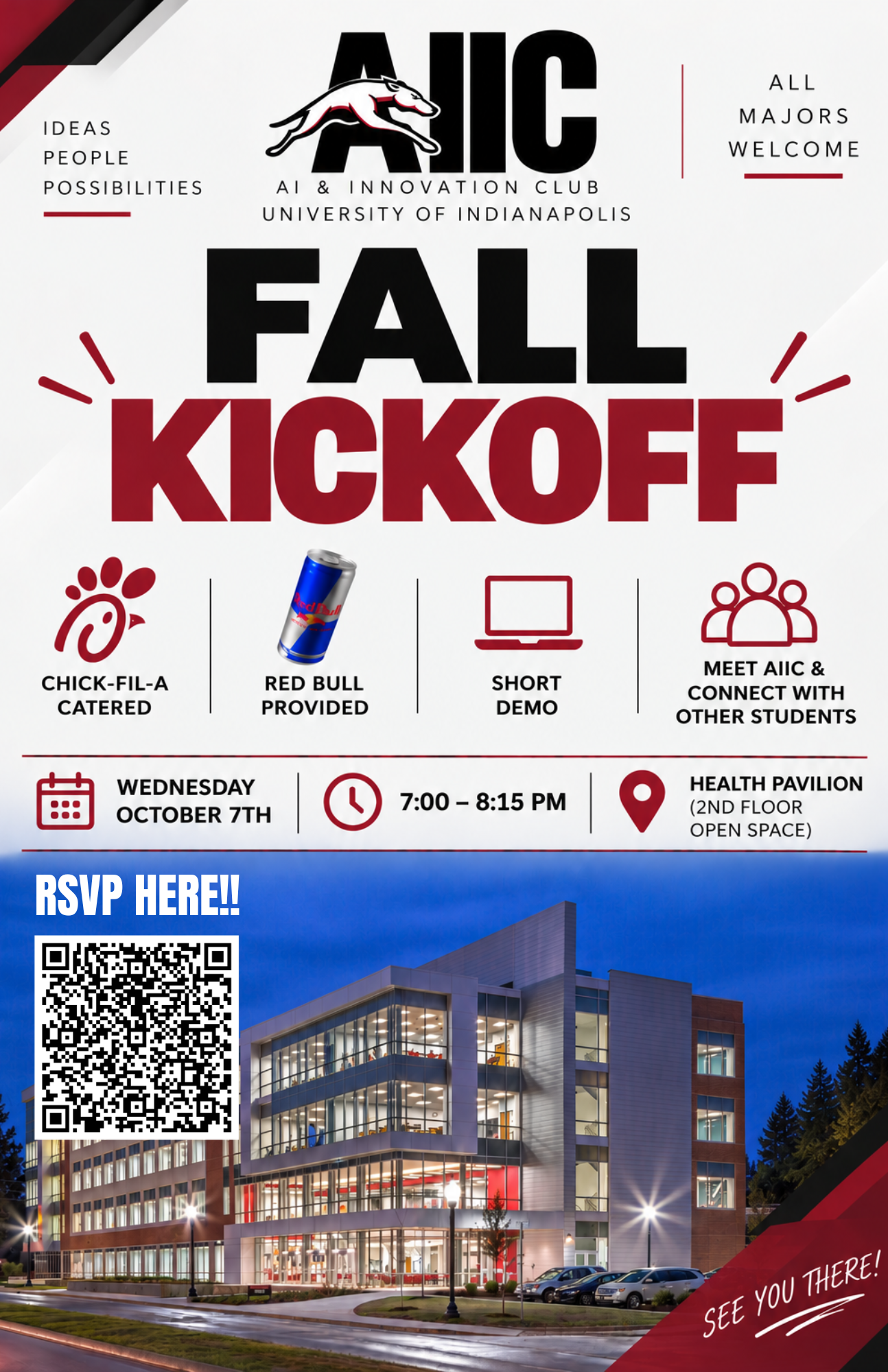
Upcoming Event
Join us for our next session.
Competition
Use AI to analyze your course syllabi and export a custom Google Sheet to track your entire semester.
Building a Tracker for Your Semester Success
Active SessionOverview
Take control of your academic workload by learning how to prompt AI to analyze your class syllabi in minutes. In this hands-on challenge, you'll turn messy course schedules into a personalized, color-coded spreadsheet that automates your assignment tracking.
How It Works
Download Template and Syllabi
Download the syllabi for all the courses you want included in the tracker as well as the Task Tracker - Master Template found below.
Run Your Syllabus in Gemini
Upload your syllabus PDF (or paste the text) and the template into Gemini along with the provided starter prompt.
Download, Test & Iterate
Open your tracker in Google Sheets. Head back to Gemini to prompt further — ask it to tweak your setup, add conditional formatting colors for completed tasks, or build custom columns to fit your workflow!
Don't forget the template!
Ensure you download and upload the Task Tracker - Master Template and upload it with your syllabi. This tells Gemini exactly how to format the tracker.
Your workflow
template and Syllabi PDF file or Raw text
prompt + Upload all files Add Role, Task & .csv format
Gemini upload syllabus + prompt
Sheet export Open in Sheets
Iterate prompt for colors & upgrade
Copy this Starter Prompt to Get Started
Upload your syllabi PDFs and the Task Tracker - Master Template into Gemini, then paste this prompt:
CONTEXT:
I am a student at the University of Indianapolis (UIndy). I have attached my course syllabi and my blank master task tracker spreadsheet template.
ROLE:
Act as a detail-oriented Academic Assistant.
TASK:
Analyze all attached course syllabi and extract every assignment, reading, quiz, lab, exam, project, and official UIndy academic break/holiday. Populate all of this information into an editable Google Sheet that matches the exact structure of my attached spreadsheet template.
FORMAT & COLUMNS:
Output all extracted tasks sorted chronologically from earliest to latest. Use these exact 7 columns in this order:
- Done: insert empty check boxes for every row.
- Date: Due date in MM/DD/YYYY format. (If a date is unclear, write "TBD").
- Course: Course code or name (e.g., BUS 101, ENG 102).
- Task Description: Name of the assignment, exam, quiz, or break.
- Urgency: Label as "High" (midterms, finals, major projects), "Medium" (weekly homework, quizzes, readings), or "Low" (breaks, holidays).
- Notes / Topic Details: Chapter numbers, topic details, or submission notes mentioned in the syllabus.
RULES:
- Do not make up or guess any missing dates.
- Account for all UIndy breaks and holidays (Labor Day, Fall Break, Thanksgiving Break).
- Output the final schedule as an editable Google Sheet matching the template.
Pro-Tip: Before hitting send on your customized prompt, add this line at the bottom: "Before creating the schedule, ask me any clarifying questions you need to ensure complete accuracy." This forces Gemini to identify missing details (like assignment weights or unclear dates) so your tracker comes out perfect on the first try!
Tools Needed
- A Laptop
- Gemini (Free version is fine)
- Your Course Syllabi (PDF or text)
- The Task Tracker - Master Template (download below)
Workshop Downloads
Download the Task Tracker template (required) and a sample syllabus if you need one.
Practice Playground
HTML/JS/CSSStudent Resources
Explore vetted AI resources, educational podcasts, and curated toolsets to accelerate your innovation journey.
Get In Touch
Have questions or want to collaborate? Reach out to us at aiic@uindy.edu